Simba documentation
Halo and Trademark Channels — Configuring Cross-Brand Effects
This guide explains how to configure halo and trademark channels in Simba for multi-brand portfolio analysis. These features are configured during the Variable Selection step of the Model Creation Wizard and directly affect how smart defaults calculate prior distributions. For the conceptual background, see Halo Effects.
When to Use Halo and Trademark Channels
Configure these channels when:
- You have a multi-brand portfolio (hierarchy column selected) and suspect advertising for one brand influences sales of other brands
- You run masterbrand or corporate campaigns that are not specific to a single brand
- You want the optimizer to account for cross-brand spillover when allocating budget
Requirement: Both halo and trademark channels only appear when you have a hierarchy/brand column selected with linked media variables. Without a multi-brand setup, these sections are hidden.
Configuring Halo Channels
Halo channels represent brand awareness activities (TV, OOH, sponsorships) whose effects spill over to other brands in a portfolio. Configuration is per-brand — you choose which channels are halo for each brand independently.
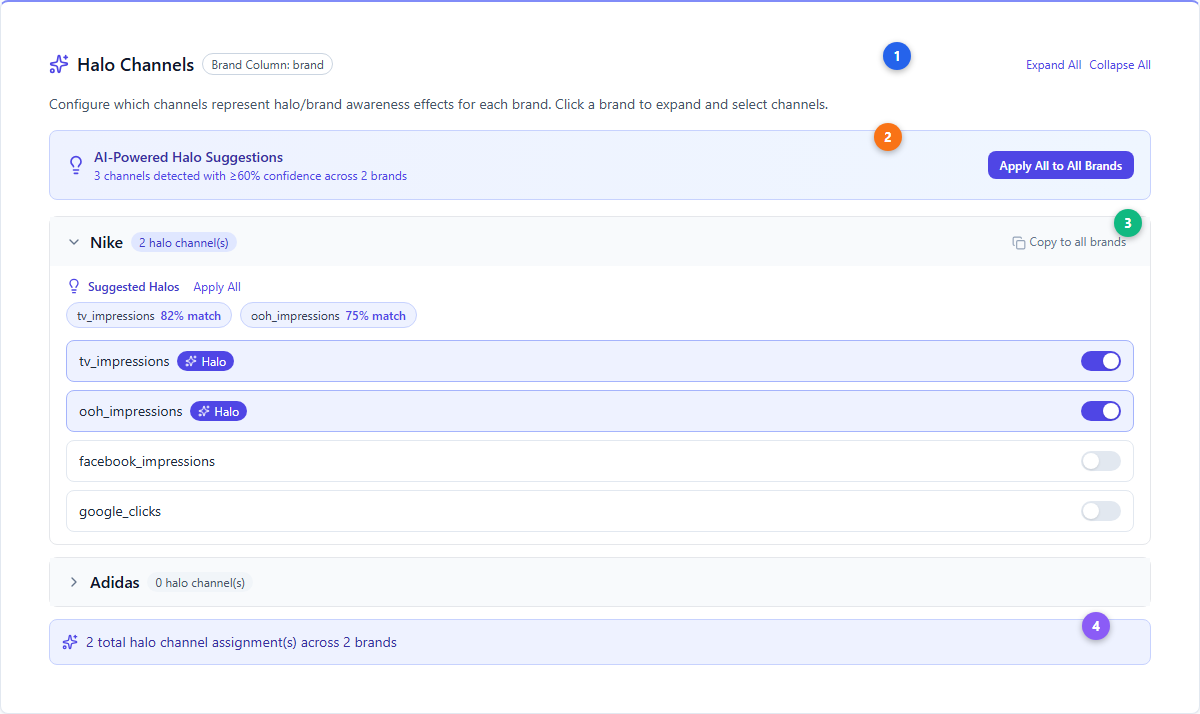
| # | Element | Description |
|---|---|---|
| 1 | Halo Channels header | Sparkles icon (indigo). Shows the hierarchy column name as a badge. Expand All / Collapse All buttons for multi-brand views. |
| 2 | AI-Powered Suggestions | Indigo gradient banner showing AI-detected halo candidates with ≥60% confidence. “Apply All to All Brands” applies suggestions across the entire portfolio at once. |
| 3 | Per-brand configuration | Each brand expands to show its channels. Toggle switches (indigo) mark individual channels as halo. Suggested channels show confidence scores (e.g., “82% match”). “Copy to all brands” replicates one brand’s halo configuration across all others. |
| 4 | Summary | Shows total halo channel assignments across all brands |
Semantic Detection
Simba’s AI analyzes variable names to suggest likely halo channels:
- Halo keywords (increase confidence): awareness, brand, branding, tv, television, video, youtube, social, display, sponsorship, pr, influence, ooh, outdoor
- Performance keywords (decrease confidence): search, sem, ppc, performance, conversion, retargeting, remarketing, affiliate, direct
- Suggestions appear when confidence ≥ 60% (keyword match score × 5, capped at 85%)
Validation Rules
- At least one brand must have non-halo channels — you cannot mark every channel as halo for every brand
- An “All Halos!” warning (orange badge) appears if all channels for a brand are marked as halo
Configuring Trademark Channels
Trademark channels represent portfolio-wide advertising (masterbrand, corporate, umbrella campaigns). Unlike halo channels, trademark channels are always global — they apply to all brands equally.
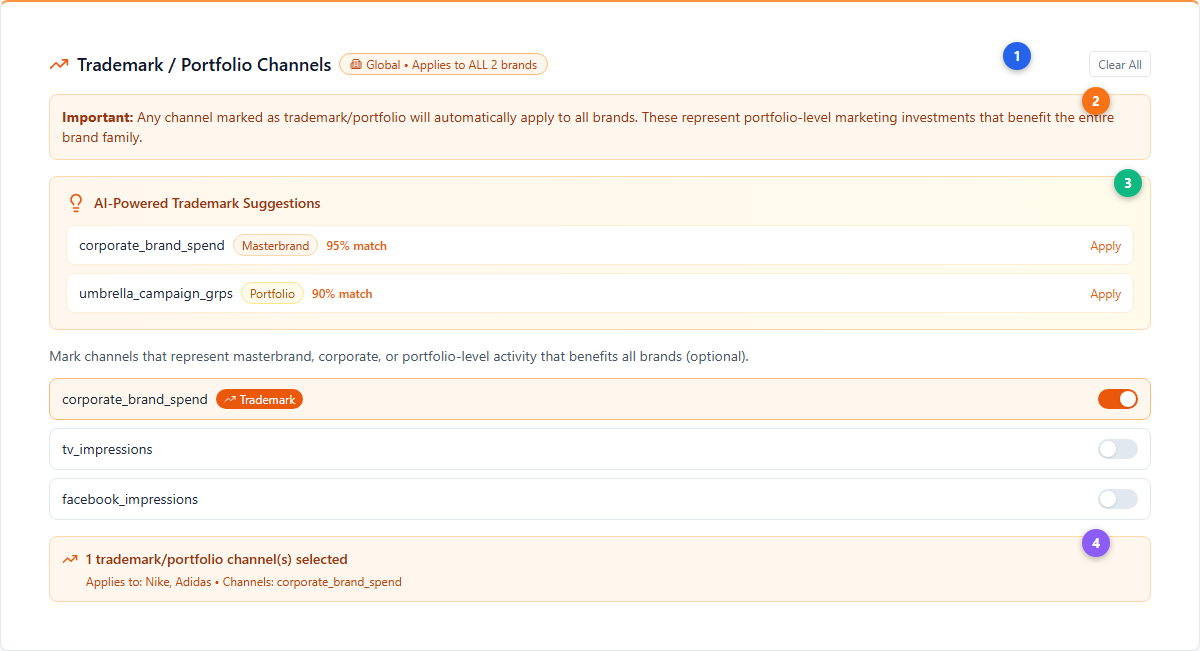
| # | Element | Description |
|---|---|---|
| 1 | Trademark header | TrendingUp icon (orange). Global badge with Building2 icon confirms the “Applies to ALL brands” scope. Clear All button resets selection. |
| 2 | Global notice | Orange info box emphasizing that trademark channels automatically apply to all brands in the portfolio |
| 3 | AI-Powered Suggestions | Orange gradient banner with detected trademark candidates. Each suggestion shows a type badge — Masterbrand (orange), Portfolio (amber), or Corporate (yellow) — plus confidence score. |
| 4 | Summary | Shows count of selected trademark channels and lists affected brands and channel names |
Trademark Type Detection
The semantic matcher identifies three trademark types:
| Type | Badge Color | Keywords | Confidence |
|---|---|---|---|
| Masterbrand | Orange | master, corporate, umbrella, parent, main | 95% |
| Portfolio | Amber | portfolio, trademark, brand_portfolio, multi_brand, cross_brand | 95% |
| Corporate | Yellow | corporate, company, group, organization | 90% |
Key Difference: Halo vs Trademark
| Feature | Halo | Trademark |
|---|---|---|
| Scope | Per-brand (different channels per brand) | Global (same channels for all brands) |
| Icon | Sparkles (indigo) | TrendingUp (orange) |
| Purpose | Brand-specific awareness spillover | Portfolio-wide umbrella campaigns |
| Validation | Must have non-halo channels per brand | No restrictions |
| Data structure | Record<string, string[]> (brand → channels) |
string[] (flat list) |
How Halo & Trademark Affect Priors
When smart defaults calculate prior distributions, halo and trademark channels receive different treatment than normal media channels.
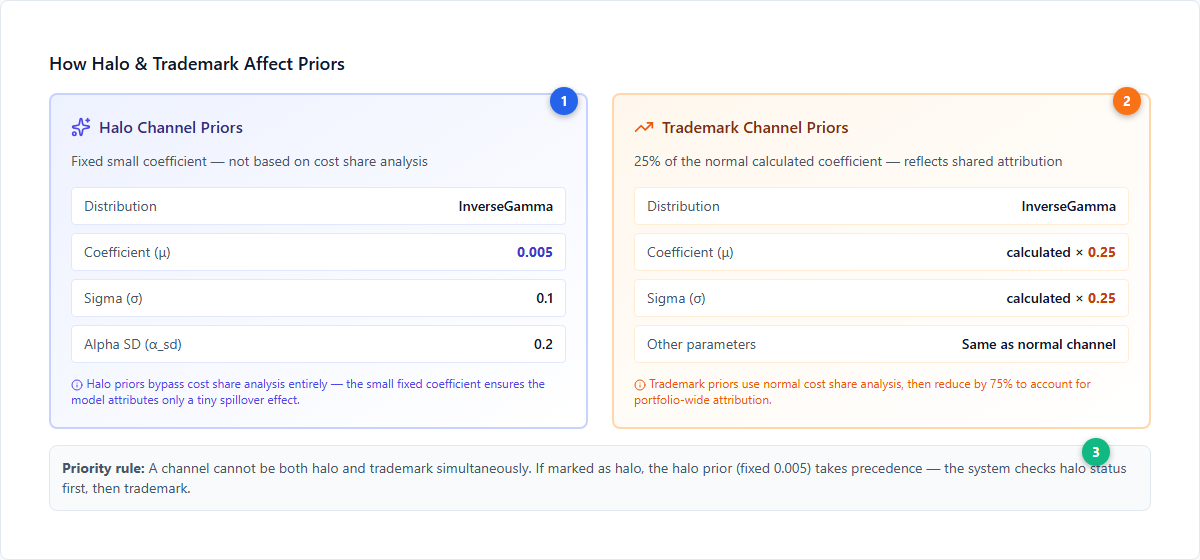
| # | Element | Description |
|---|---|---|
| 1 | Halo priors | Fixed small coefficient (μ = 0.005, σ = 0.1, α_sd = 0.2). Bypasses cost share analysis entirely. InverseGamma distribution. |
| 2 | Trademark priors | Takes the normal calculated coefficient and multiplies both mean and sigma by 0.25 (25%). All other parameters (decay, saturation, adstock) remain the same as a normal channel. |
| 3 | Priority rule | A channel cannot be both halo and trademark. If marked as halo, the fixed 0.005 coefficient takes precedence. |
Halo Channel Prior Values
| Parameter | Value | Reasoning |
|---|---|---|
| Distribution | InverseGamma | Same as all media channels |
| Coefficient (μ) | 0.005 (fixed) | Tiny effect — halo channels contribute a small spillover, not direct revenue |
| Sigma (σ) | 0.1 | Higher uncertainty to allow the model flexibility |
| Alpha SD (α_sd) | 0.2 | Standard saturation shape uncertainty |
Trademark Channel Prior Values
| Parameter | Value | Reasoning |
|---|---|---|
| Distribution | InverseGamma | Same as all media channels |
| Coefficient (μ) | calculated × 0.25 | 25% of what a brand-specific channel would receive |
| Sigma (σ) | calculated × 0.25 | Proportionally reduced uncertainty |
| Other parameters | Same as normal | Decay, saturation, adstock are unchanged |
How Halo & Trademark Appear in the Prior Builder
In the Custom AG Grid, halo and trademark channels display distinctive badges next to their variable names, and their coefficient values reflect the adjusted priors.
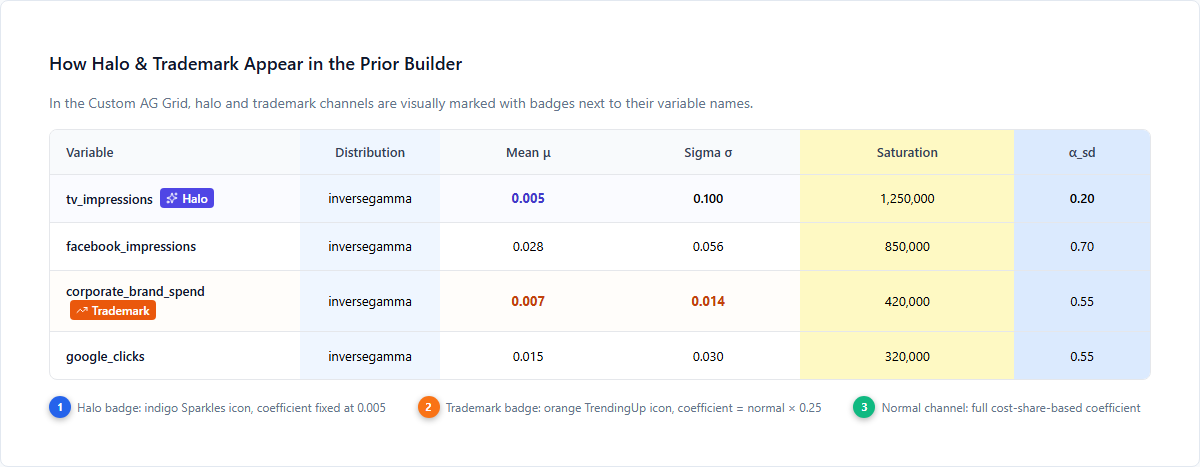
The inline legend explains the visual indicators:
- Halo badge (indigo Sparkles icon): coefficient fixed at 0.005, visually highlighted with indigo background
- Trademark badge (orange TrendingUp icon): coefficient = normal calculated value × 0.25, highlighted with orange background
- Normal channels: full cost-share-based coefficient with no badge
How the Optimizer Handles Cross-Brand Effects
When running portfolio optimization with halo and trademark channels configured:
- The optimizer objective function accounts for both
halo_channelsandtrademark_channels - Cross-brand spending effects are factored into budget allocation
- Halo channels receive credit for their total portfolio impact, not just their direct brand impact
- Trademark channel budget is optimized against total portfolio revenue across all brands
Best Practices
- Start with AI suggestions — review Simba’s semantic detection before manually configuring. The suggestions are calibrated to common naming patterns with a 60% confidence threshold.
- Use trademark for umbrella campaigns — if a campaign is not brand-specific, it’s a trademark channel
- Use halo for brand-specific spillover — if Brand A’s TV campaign lifts Brand B, mark Brand A’s TV as a halo channel
- Don’t mark everything as halo — at least one brand needs non-halo channels for the model to estimate direct effects
- Review results — check measurement outputs to validate that cross-brand effects are being captured as expected
- A channel can’t be both — halo takes precedence if somehow marked as both
Next Steps
Platform guides:
- Portfolio Analysis — Full portfolio analysis workflow
- Budget Optimization — How halo/trademark effects change optimization
- Smart Defaults — How AI Media Priors are calculated
- Model Configuration — Prior Builder deep reference
- Model Creation Wizard — The full model setup process
Core concepts:
- Halo Effects — Conceptual background on cross-brand marketing impact
- Priors and Distributions — Understanding prior distributions
- Saturation Curves — Diminishing returns modeling
- Adstock Effects — Carryover and decay effects
- Bayesian Modeling — The Bayesian approach